
Download Skitch for Windows – Image Annotation, Visual Communication, Productivity Tool
Overview
Skitch for Windows is a dedicated image annotation tool designed to simplify visual communication across personal and professional workflows. The application enables users to annotate screenshots, photos, and digital images with precision and ease, making it ideal for individuals who need to convey ideas clearly and efficiently. Whether marking up a map, highlighting key sections in a document, or adding instructions to a design, Skitch provides the essential tools to enhance clarity and understanding. Its primary purpose lies in bridging the gap between verbal explanation and visual representation, particularly useful in remote collaboration, education, and project planning scenarios.
The app is especially beneficial for professionals such as designers, educators, technical support staff, and team leaders who rely on visual aids to communicate complex information. Students and content creators also find value in its ability to emphasize important details without requiring advanced graphic design skills. Although the developer did not provide additional background information, Skitch’s consistent presence in the Windows ecosystem since its 2015 release suggests a stable and functional platform. The app operates as a lightweight utility that integrates seamlessly into daily digital tasks, offering a focused experience without unnecessary distractions.
Given its niche focus on image annotation, Skitch fills a specific gap in the productivity tool landscape. While many apps offer image editing, few prioritize simplicity and speed in visual explanation. Skitch’s ability to allow users to mark up images quickly and share them across platforms makes it a valuable asset in workflows that depend on visual clarity. Its role in enabling fast, effective communication underscores its relevance in modern digital environments.
Key Features & Functionality
- Intuitive Annotation Tools: Skitch provides a straightforward set of tools including arrows, shapes, and text boxes. These allow users to highlight specific areas of an image with minimal effort. For example, a teacher can draw an arrow to point out a formula in a math problem, or a developer can circle a bug in a UI screenshot.
- Image Editing Flexibility: Users can crop, zoom, and pixelate sections of an image to focus attention on relevant content. This functionality supports custom visual storytelling—such as obscuring sensitive data in a shared screenshot—while preserving the core message.
- High-Contrast Text Options: The app includes text styling with high-contrast colors, ensuring readability on complex or busy backgrounds. This feature is particularly useful when annotating detailed infographics or images with varied textures and gradients.
- Seamless Sharing Capabilities: Once an image is annotated, it can be exported and shared with any application that accepts image files. This enables instant integration into emails, messaging platforms, or collaborative tools, streamlining the workflow for team-based projects.
- Editable at Any Time: All annotations—shapes, text, and drawings—can be repositioned, resized, or deleted at any stage. This non-destructive editing approach allows users to refine their work iteratively, correcting mistakes or improving clarity without starting from scratch.
These features collectively support real-world use cases such as remote troubleshooting, classroom instruction, and project feedback. The ability to edit anytime ensures that users maintain full control over their visual content, enhancing both accuracy and confidence in communication.
Interface, UX & Performance
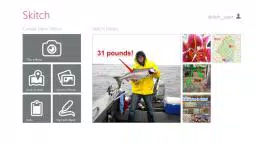
Skitch for Windows features a clean, minimal interface that prioritizes accessibility and ease of use. The main workspace is centered around the uploaded image, with a toolbar positioned along the top or side—depending on screen size—offering quick access to annotation tools. Navigation is intuitive, with a logical flow that guides users from image import to editing and export. The visual style is uncluttered, avoiding visual noise that could distract from the primary task.
Interaction is smooth, with responsive controls that react instantly to user input. The app maintains consistent performance across various device configurations, though the developer did not list formal performance metrics. Although the app was released in 2015, it continues to function reliably on modern Windows systems, suggesting ongoing compatibility and stability. Users can expect fast load times and minimal lag during annotation tasks, even with larger image files.
While the app does not include advanced features like cloud sync or multi-user collaboration, its lightweight design ensures it runs efficiently without consuming excessive system resources. The lack of complex animations or background processes contributes to its reliability. Overall, the user experience is focused, efficient, and well-suited to its core purpose: quick, effective image annotation.
Platform Compatibility & Technical Requirements
Skitch for Windows is designed to run on the Windows operating system. The app’s file size and specific version details were not disclosed by the developer. Compatibility information was not fully disclosed, and no minimum OS requirements were listed. As such, users are advised to check system compatibility before installation.
Although the app was released in 2015, it remains accessible through official distribution channels. The absence of updated technical specifications means that installation on newer or older Windows versions may depend on system configuration. Users should ensure their device meets general Windows compatibility standards for third-party applications.
Pros and Cons
- Simple, intuitive interface for fast learning and use
- Effective tools for visual communication and idea sharing
- High-contrast text ensures readability on any background
- Non-destructive editing allows for flexible revisions
- Lightweight and efficient performance on standard systems
- Outdated release date may raise concerns about long-term support
- Limited to image annotation—no advanced editing or design features
- No cloud integration or real-time collaboration capabilities
- Developer did not provide technical details such as OS version or file size
- Not available on mobile platforms (as per current data)
FAQ
Is Skitch for Windows safe to download and install?
Yes, Skitch for Windows is a legitimate tool distributed through official channels. As with any software, it is recommended to download only from trusted sources to ensure security and avoid malware.
Can I use Skitch to edit photos beyond annotations?
While Skitch allows basic image adjustments such as cropping, zooming, and pixelation, it is primarily designed for annotation rather than comprehensive photo editing. For advanced photo manipulation, users may need to use dedicated image editing software.
Does Skitch support real-time collaboration?
Skitch for Windows does not include built-in real-time collaboration features. Users can share annotated images via email or file transfer, but simultaneous editing or live feedback is not supported.
Is Skitch available for Android or iOS?
Based on current information, Skitch for Windows is the only version available. The app is not listed in mobile app stores, and no official mobile versions were mentioned by the developer.
How often is Skitch updated?
The developer did not provide information on update frequency. The last known release was in 2015, which may indicate limited ongoing development. Users should verify the latest version through official sources.
Final Thoughts
Skitch for Windows remains a reliable and focused tool for anyone needing to annotate images quickly and effectively. Its straightforward interface, practical annotation features, and seamless sharing options make it a valuable utility in both personal and professional contexts. While its age and lack of modern integrations are notable limitations, its core functionality continues to serve users who prioritize clarity and simplicity in visual communication.
Professionals in education, IT support, and project management, as well as students and content creators, will find the app particularly useful for conveying ideas without requiring design expertise. Its lightweight nature ensures it runs smoothly on most Windows devices, making it accessible to a broad audience.
Despite its outdated release date, Skitch for Windows delivers consistent value for its intended purpose. For those seeking a no-frills, efficient image annotation tool, it remains a solid choice.
Download Skitch for Windows now


